# Authenticate Zoho CRM in PHP
> Generate access token with OAuth2 and start using API 2.0 in PHP app.
BlowStack blog, published 2020-10-01, updated 2022-10-15, 15 min read. Page: https://blowstack.com/blog/authenticate-zoho-crm-in-php
You can clone ready boilerplate Zoho CRM implementation for:
Laravel
[https://github.com/blowstack/zoho-crm-laravel.git](https://github.com/blowstack/zoho-crm-laravel.git)
Symfony
[https://github.com/blowstack/zoho-crm-symfony.git](https://github.com/blowstack/zoho-crm-symfony.git)
## Zoho CRM PHP SDK installation
Install the official Zoho SDK for PHP.
Open the console, go to the folder where your app resides and type the following command:
```php
composer require zohocrm/php-sdk
```
Before using API you are obliged to register and use a Zoho client.
It's an easy process just go to the [Zoho console](https://accounts.zoho.com/signin?servicename=AaaServer&serviceurl=%2Fdeveloperconsole) and login into your account.
There are multiple ways to register a new client. During this post we will stick to **self-client.**
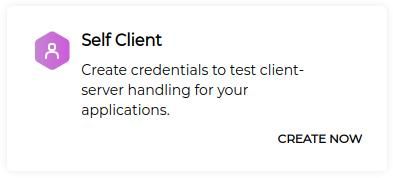
Zoho CRM OAuth Self Client option
**Self-client** is enough to integrate Zoho CRM system in a way that your web/mobile app handles all the communication without need to authenticate other users. In other words your app will be the client / user. This will enable you to fully use all the available modules and functionality through the backend.
After registering a client there will be two tabs, don't fill the form in the Generate Code tab yet. We will only need automatically generated data from the Client Secret tab at the moment.
Having Client ID and Clients secret we can proceed to the SDK configuration stage.
## Zoho CRM PHP **SDK Configuration**
First you have to consider where you want to keep your authorization tokens. There are two possibilities:
- in file (**recommended**)
- in database
**SECURITY NOTICE**
For security reasons I strongly discourage you to save tokens in a database thus we will cover only persistence in a file.
* * *
To proceed we need to create a file with the name **zcrm\_oauthtokens.txt** where all the tokens will be stored.
Put **crm\_oauthtokens.txt** into the config folder and then into a Zoho folder (you need to create it first).
Make a new controller for token generation and name it **ZohoOauthController**.
Inside the controller create a new array with config. Just copy & paste client _id and client_ secret from the newly registered client (Client Secret tab).
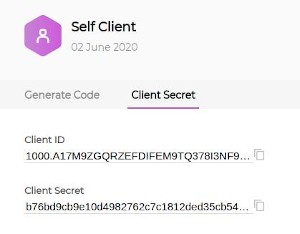
Zoho CRM OAuth Client Secret tab
Redirect uri has to be filled but it can be a dummy url as we use a self client and it's not really needed here. For the currentUserEmail field pass your email address for the Zoho developer console. In token _persistence_ path pass the **absolute path** to the **crm\_oauthtokens.txt** file.
```php
$configuration = [
"client_id" => client_id,
"client_secret" => client_secret,
"redirect_uri" => redirect_url,
"currentUserEmail" => user_email,
"token_persistence_path" => path_to_crm_oauthtokens.txt
];
```
### **Symfony** implementation
```php
bin/console make:controller
```
- **ZohoOauthController.php**
```php
'1000.A17M9ZGQRZEFDIFEM9TQ378I3NF9PH',
"client_secret" => 'b76bd9cb9e10d4982762c7c1812ded35cb54d5404f',
"redirect_uri" => 'http://dummy_address',
"currentUserEmail" => 'dev@blowstack.com',
"token_persistence_path" =>"/home/blowstack/Projects/boilerplates/zoho_crm_symfony/config/Zoho"
];
$result = 'failed';
try {
ZCRMRestClient::initialize($configuration);
$oAuthClient = ZohoOAuth::getClientInstance();
$grantToken = $grant_token;
$oAuthTokens = $oAuthClient->generateAccessToken($grantToken);
$result = 'success';
}
catch (\Exception $exception) {
$result = $exception;
}
return $this->render('zoho_oauth/index.html.twig', [
'result' => $result,
]);
}
}
```
- **zoho\_oauth/index.html.twig**
```php
{% extends 'base.html.twig' %}
{% block title %}Zoho Oauth{% endblock %}
{% block body %}
{{ result }}
{% endblock %}
```
### **Laravel implementation**
```php
php artisan make:controller ZohoOauthController --invokable
```
- **ZohoOauthController.php**
```php
'1000.A17M9ZGQRZEFDIFEM9TQ378I3NF9PH',
"client_secret" => 'b76bd9cb9e10d4982762c7c1812ded35cb54d5404f',
"redirect_uri" => 'http://dummy_address',
"currentUserEmail" => 'dev@blowstack.com',
"token_persistence_path" =>"/home/blowstack/Projects/boilerplates/zoho_crm_laravel/config/Zoho"
];
try {
ZCRMRestClient::initialize($configuration);
$oAuthClient = ZohoOAuth::getClientInstance();
$grantToken = $grant_token;
$oAuthTokens = $oAuthClient->generateAccessToken($grantToken);
$result = 'success';
}
catch (\Exception $exception) {
$result = $exception;
}
return view('zoho_oauth', ['result' => $result]);
}
}
```
- **routes/web.php**
```php
Route::get('zoho/oauth/{grant_token}', 'ZohoOauthController');
```
- **zoho\_oauth.blade.php**
```php
Zoho OAuth
{{ $result }}
```
## **Access and Refresh Token generation**
The Controller and the route has been set up so it's time to generate our tokens but first you need a grant token in order to generate other tokens like access _token and refresh_ token. The good news is it's only a one time process so let's finish it up now! Get back to the zoho developer console.
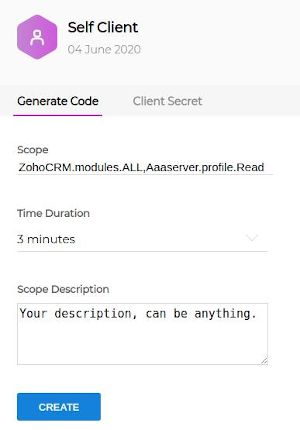
Zoho CRM OAuth Grant Token Generation
There is a Generate Code tab in the self client option . Fill the form in the following way:
- **Scope\***
ZohoCRM.modules.ALL, Aaaserver.profile.Read
(there can't be spaces between commas separating scope names!)
- **Time duration**
3 minutes
- **Scope description**
Whatever but it has to be filled out.
\*reconsider this scope in the production environment. Those two give you minimal access needed to generate tokens and make all API calls related to modules which should be enough in most cases though.
Copy the generated grant token and paste it to the url you-r_app-address/zoho/oauth/{grant-_token}.
If all went well your previously created file **zcrm\_oauthtokens.txt** will be filled with data and you should see a success text. From now on the process will be fully automated.
## **What's next?**
You are ready to use the API!
But you can do one more thing related to the code. Namely you can refactor it by creating a zoho service which will become truly useful when you start using the API heavily in different part of your app. It will take 2 additional minutes now but it will save you a lot of time in the future so it’s definitely worth doing it.
### **Symfony** implementation
In the **src/Service** create a new class named ZohoCRM in that way.
```php
configuration = [
"client_id" => $config_values['client_id'],
"client_secret" => $config_values['client_secret'],
"redirect_uri" => $config_values['redirect_uri'],
"currentUserEmail" => $config_values['currentUserEmail'],
"accounts_url" => "https://accounts.zoho.com",
"token_persistence_path" => $config_values['token_persistence_path'],
"access_type" => "offline",
"persistence_handler_class" => "ZohoOAuthPersistenceHandler"
];
ZCRMRestClient::initialize($this->configuration);
}
public function generateAccessToken(string $grant_token): string {
$configuration = $this->configuration;
try {
ZCRMRestClient::initialize($configuration);
$oAuthClient = ZohoOAuth::getClientInstance();
$grantToken = $grant_token;
$oAuthTokens = $oAuthClient->generateAccessToken($grantToken);
return 'success';
} catch (\Exception $exception) {
return $exception;
}
}
}
```
Then pass the config values into tha services.yaml file:
```plaintext
//services.yaml
parameters:
zoho_crm:
client_id: '1000.FT392KQV3WP8YMZ4A8L3PPJO40DRKH'
client_secret: '676611b6b29038ab5d6cb82c2ae5bb2a7843cfb728'
redirect_uri: 'http://dummy_address'
currentUserEmail: 'dev@blowstack.com'
token_persistence_path: '/home/blowstack/Projects/boilerplates/zoho_crm_symfony/config/Zoho'
```
And register your new service passing the config values:
```plaintext
//services.yaml
services:
...
App\Service\ZohoCRM:
arguments:
$config_values: '%zoho_crm%'
```
Finally inject the new service into the controller and remove the old code. Notice that our controller became more readable and concise.
```plaintext
generateAccessToken($grant_token);
return $this->render('admin/zoho_oauth/index.html.twig', [
'result' => $result,
]);
}
}
```
---
BlowStack: AWS practice exams and courses, https://blowstack.com/practice-exams